





So many people asking about how to create an expandable posts on blogger. Of course you can find it out there via Google. but to make your work easier, I have listed all the blogger hacks here. Below are the list of who I think they are the original writers of the hacks.
I split these hacks into 3 categories.
1. Expandable post hacks work on New Blogger
2. Expandable post hacks work on Classic Blogger.
3. Expandable Posts Hack work on both New Blogger and Classic Blogger.
So here it is
New Blogger Version:
1. Expandable posts on Blogger with Peekaboo View.
This one is created by Ramani, or being well known as Hackosphere. With this hack, you will have a read more link under your post on your frontpage. but instead of opening in a new window, this hack will show the rest of the post right on the frontpage it self. Hope you got what i mean.
But being nice Ramani is, he has also created the second version of this hack
2. Selective Expandable Posts.
On this version, each time readers click on the read more link, they will be redirected to the post page.
3. Expandable Posts Summaries.
Like another hack about read more in blogger, This hack will also let you learn about how to create an expandable post in blogger. the different is that this hack will open the result on the new window. of course it could be easily change just by removing the code of target=”_blank”. this hack was created by Beta blogger for dummies.
4. Expandable Post Summaries for New Blogger.
This post was written by Peter Chen of Blogger-Trick.Blogspot.Com. This hack is actually the same as Hackospehere hack up there. It’s just that Peter has his own style on describing this hack. So hope you can have a better understanding of this blogger hack.
For Classic Blogger:
5. Making expandable blog posts in Blogger.
This hack work on Classic Blogger. written by NoFancyName, they wrote the description pretty well.
6. How can I create expandable post summaries?
And this last hack was written by the Blogger Help them self. It’s pretty amusing isn’t it? They create the tutorial to create an expandable posts summaries for Classic Blogger, but leave all the new blogger users alone
Work Both for New Blogger and Classic Blogger.
7. Expandable Posts Hack for both New Blogger and Classic Blogger.
This hack was created by Aditya Mukherjee (Did I type it correct? : ). This hack is unique. While other hacks require you to swap your full posts with a div or span etc. This hack ask you to wrap the full post with [hide]…your full post here…[/hide]. So I think it’s pretty interesting. but unfortunately, on the demo he gave us, I can’t see it works. ??
Hope you will like it......
Showing posts with label Blogger Hack. Show all posts
Showing posts with label Blogger Hack. Show all posts
Wednesday, December 19, 2007
Expandable post summaries for professional blog design - blogger hack
With little bit of modifications to your Blogger Beta template you can easily implement expandable post summaries in your blog main page. Expandable posts gives very professional and elegant look to your blog. You can hide most of the detailed content from main page and display them when the page of the post is opened.
If you observer my blog, voting widgets are displayed on my post links and not in my main page. Also, most of the images in my posts are shown only in the actual post links only. Moving bandwidth intensive content to posts' pages loads your main page very fast.
Let us see the steps to be followed for modifying the template to implement this
- Log in to your blogger account select Layout of the blog which you want to modify
- Navigate through Template --> Edit HTML
- Take backup of your template by clicking Download Full Template. This backup will help you if you want to revert to old template
- Search for ]]></b:skin> in your template HTML and paste the following piece of code in between ]]></b:skin> and </head>
<!-- Style to implement "Read more on this Article" link in all the posts (Start) -->
<style>
<b:if cond='data:blog.pageType == "item"'>
span.fullpost {display:inline;}
<b:else/>
span.fullpost {display:none;}
</b:if>
</style>
<!-- Style to implement "Read more on this Article" link in all the posts (End) -->
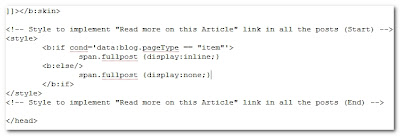
- After pasting the code, your template should look like as shown in the following image
- Save your template and click on select Expand Widget Templates
- Search for <data:post.body/> in the template HTML and paste the following piece of code after <data:post.body/>
<!-- Code to show "Read more on this article..." Link (Begin) -->
<b:if cond='data:blog.pageType != "item"'>
<span>
<a expr:href='data:post.url' style='color:#0000FF; text-align:right; font-weight:bold; text-decoration:none' >Read more on this article...</a>
</span>
</b:if>
<!-- Code to show "Read more on this article..." Link (End) -->
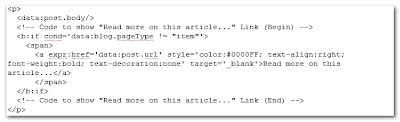
- After pasting the code, your template should look like as shown in the following image
- That's all. Your template is modified to show expandable posts.
- Now in every post, the content which you want to show only in post's page should be included between <span class="fullpost">This will be shown only in post's page</span>.
- Post a test article using the following HTML to see your blog working as expected
Blogger Title & Meta Tag Keyword ,Description hack
Every SEO guru and even pseudo guru will tell you the importance of Meta Keyword and description Tag in SEO, and it is obvious there are plugins to do just that in wordpress !
But there is no feature blogger to customize the Meta Tags.
So I made some easy mods to optimize the Meta tags for Keywords, Description, Title and even customize for the Index page, post page and archive !
By default Blogger gives only the title which is :-
This give the output as the Title of your blog !
So to start the mod we need to identify the there types of pages i.e. Index (main page), Item page (the individual post page) and Archive ! So the code needs have 3 scenarios.
Next is the Globally available Data tags that blogger provides which is unbelievably less ! There is no post title, no post keywords. Hence we are forced to use the following
So here is the SEO meta tag code customize it according to blog before your add it to your blog HTML.
To add to your Blogger blog HTML go to Template > Edit HTML
Paste the above code (after customizing) as shown in the below image

Save the template and you are done !
But there is no feature blogger to customize the Meta Tags.
So I made some easy mods to optimize the Meta tags for Keywords, Description, Title and even customize for the Index page, post page and archive !
By default Blogger gives only the title which is :-
<title><data:blog.pageTitle/></title>
This give the output as the Title of your blog !
So to start the mod we need to identify the there types of pages i.e. Index (main page), Item page (the individual post page) and Archive ! So the code needs have 3 scenarios.
Next is the Globally available Data tags that blogger provides which is unbelievably less ! There is no post title, no post keywords. Hence we are forced to use the following
<data:blog.title/>Which is the title of your blog
<data:blog.pageTitle/>This is the Page Title.
So here is the SEO meta tag code customize it according to blog before your add it to your blog HTML.
<b:if cond='data:blog.pageType == "index"'>
<title><data:blog.title/> : Write some stuff about your blog here not too much since only 60 char is all robot read</title>
<meta name='Description' content='Describe your blog here since this is what will be shown if your index page comes in a search' />
<meta name='Keywords' content='Key, Words, Here, Dont, go crazy, only, add, relavent, keyword' />
<b:else/>
<b:if cond='data:blog.pageType == "archive"'>
<title><data:blog.title/> : Write some stuff about your blog here not too much since only 60 char is all robot read</title>
<meta name='Description' content='Describe your blog here since this is what will be shown if your index page comes in a search' />
<meta name='Keywords' content='Add, some, more, key, word, here, but, keep, it, sane ' />
<b:else/>
<b:if cond='data:blog.pageType == "item"'>
<title><data:blog.pageTitle/></title>
<meta name='Keywords' expr:content='data:blog.pageTitle' />
</b:if>
</b:if>
</b:if>
To add to your Blogger blog HTML go to Template > Edit HTML
Paste the above code (after customizing) as shown in the below image

Save the template and you are done !
Tuesday, December 11, 2007
Some google blogger (blogspot) hack
If you want to enhance the function of blogspot, following websites are necessary.
http://chenkaie.blogspot.com
http://hackosphere.blogspot.com
http://racklin.blogspot.com
http://cjhtech.blogspot.com
http://joshnote.blogspot.com/
http://arkelin.blogspot.com/
http://phydeaux3.blogspot.com/
http://hoctro.blogspot.com/
http://beautifulbeta.blogspot.com/
http://stubborn-fanatic.blogspot.com/
http://blogfresh.blogspot.com/
http://purplemoggy.blogspot.com/
http://blogger-tricks.blogspot.com/
http://blogger-hacked.blogspot.com/
http://bloggeruniversity.blogspot.com/
http://metamuse.blogspot.com/
http://www.bloggertemplates.org/
http://freeblogspottemplates.blogspot.com/
http://skyvee.blogspot.com/
http://klcintw4.blogspot.com/
http://abintech.azhai.org/
http://mygene.netfirms.com/tools/button.htm
http://www.editthis.info/bloggerhacks/Category:New_Blogger
http://ahotgirl.blogspot.com
Hot Sexy Asian Japan Korean Chinese HongKong Taiwan Bikini Girl Photo.
Gravure girl, AV girl.
http://chenkaie.blogspot.com
http://hackosphere.blogspot.com
http://racklin.blogspot.com
http://cjhtech.blogspot.com
http://joshnote.blogspot.com/
http://arkelin.blogspot.com/
http://phydeaux3.blogspot.com/
http://hoctro.blogspot.com/
http://beautifulbeta.blogspot.com/
http://stubborn-fanatic.blogspot.com/
http://blogfresh.blogspot.com/
http://purplemoggy.blogspot.com/
http://blogger-tricks.blogspot.com/
http://blogger-hacked.blogspot.com/
http://bloggeruniversity.blogspot.com/
http://metamuse.blogspot.com/
http://www.bloggertemplates.org/
http://freeblogspottemplates.blogspot.com/
http://skyvee.blogspot.com/
http://klcintw4.blogspot.com/
http://abintech.azhai.org/
http://mygene.netfirms.com/tools/button.htm
http://www.editthis.info/bloggerhacks/Category:New_Blogger
http://ahotgirl.blogspot.com
Hot Sexy Asian Japan Korean Chinese HongKong Taiwan Bikini Girl Photo.
Gravure girl, AV girl.
Sunday, December 9, 2007
Blogger Hack: Hide Blogger navbar in simple steps
Edit the blogger template with HTML, add following CSS:

#navbar {
height:0px;
visibility:hidden;
display:none
}
Subscribe to:
Posts (Atom)


